
Implementing Adaptive Bitrate Web Video Encrypted Playback: Front-End and Back-End Challenges and Solutions
Recently I ran into a web video scenario again. I had done some research on this before: A Brief Survey of H5 Video Playback
But this time it's a bit more complex. This time I'm solving:
- Technical solution research for video playback
Server-side implementation:
- Video transcoding
- Generating videos at different bitrates
- Applying standard video encryption
- Merging videos of different bitrates for dynamic bitrate playback
web side implementation
- Design of the
webplayer - Custom extensions for the
webplayer - Draggable progress bar
- Volume control
- Adaptive bitrate switching based on current bandwidth
- Manual resolution switching
- Variable playback speed
- Custom style overrides
- Standard encrypted video playback
- Built with native technology, runs in any framework, unifying cross-framework scenarios
- Consistent controls across browsers
The web-side source code has been open-sourced under the MIT license. If this helps after you finish reading, feel free to star, file issues, or send prs — I'd also love to have a friendly discussion~
Demo: https://ran.chaxus.com/src/ranui/player/
Source code: https://github.com/chaxus/ran
The demo documentation has been internationalized and can be switched to Chinese
For any project, the first step is always technical research, so let's start by looking at some well-known companies' web video playback solutions
I: Web Video Playback Solutions of Some Well-Known Companies
1. Bilibili
Let's start with Bilibili, since its core business is a video and danmaku (bullet-comment) site — a perfectly professional fit.
Let's pick an example: https://www.bilibili.com/video/BV1FM411N7LJ and visit it.
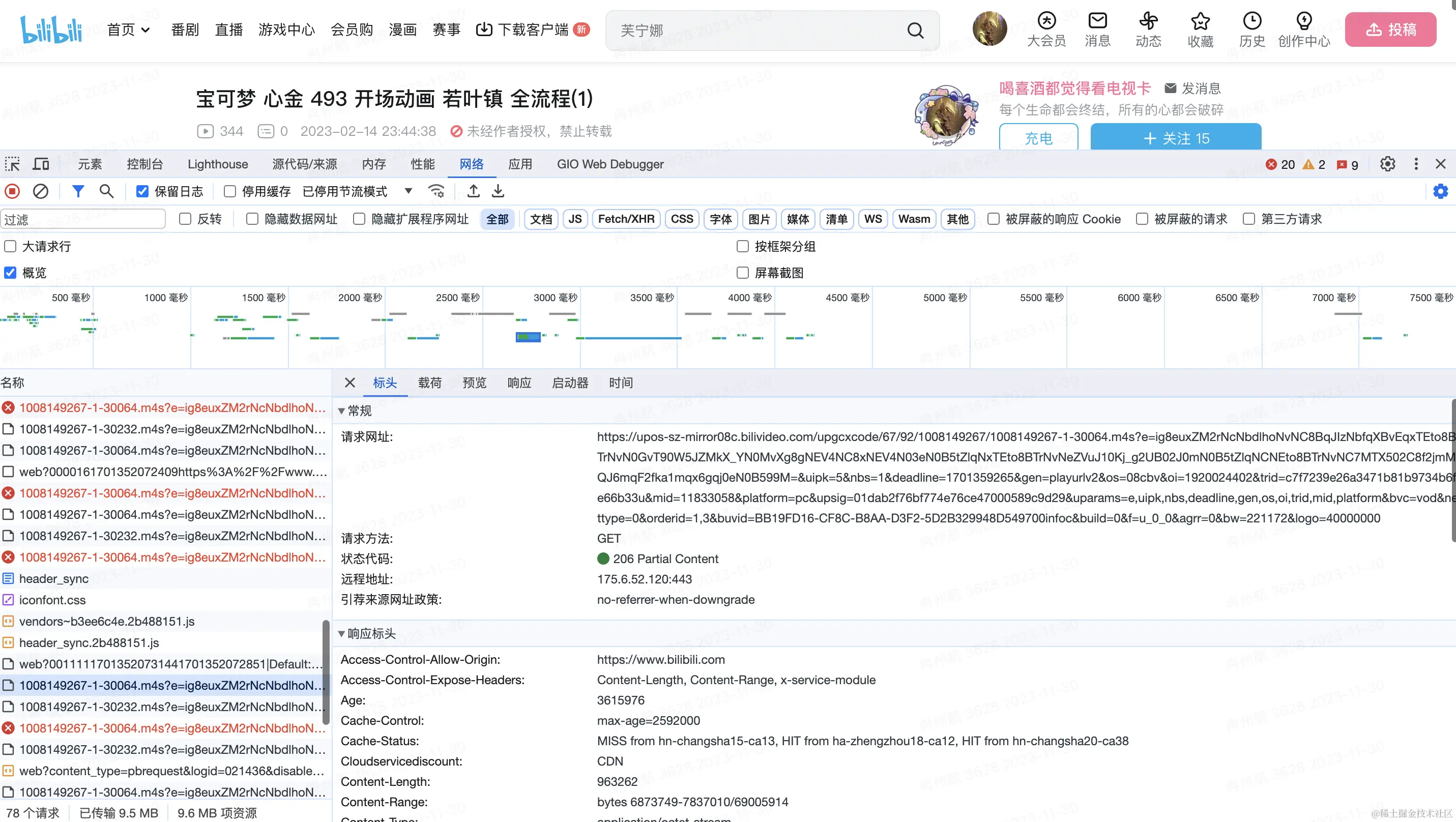
Opening the console, you can see that while the video is playing, it keeps requesting m4s video files.
After all, a whole video file tends to be quite large, so it's not feasible to wait for the entire file to be requested before starting playback. Splitting a large video file into many small segments and loading them while playing is a much better approach.

Each m4s file request is roughly a few dozen kb to a few hundred kb.
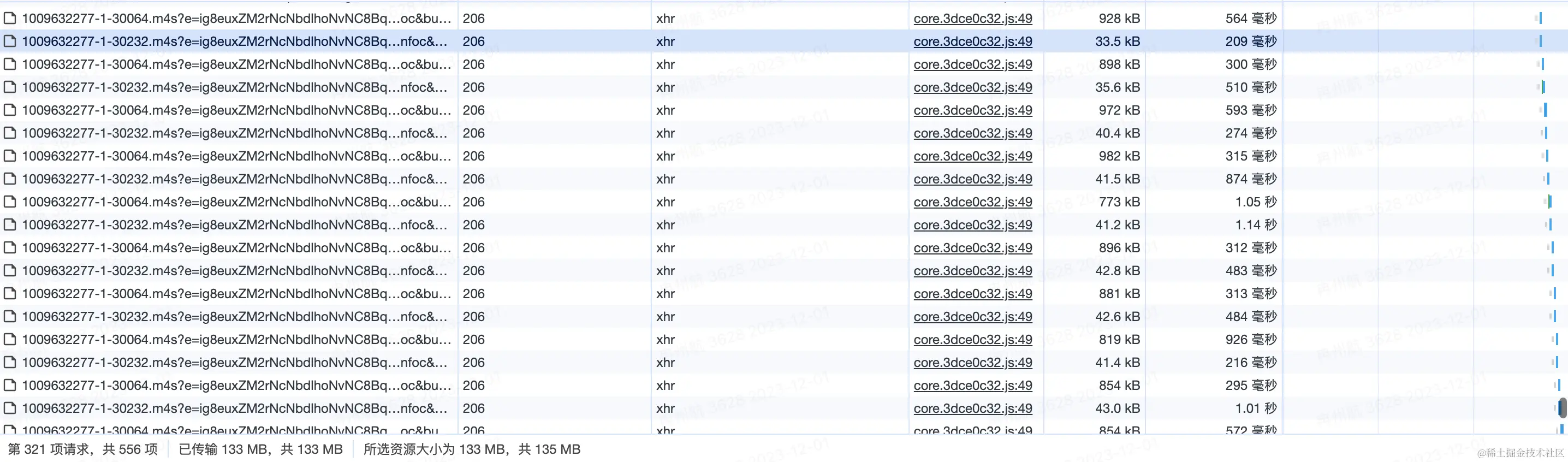
So why not just use http's range, which lets you request part of a file's content with finer granularity by specifying a byte range? In the header of an http request, it looks something like this
Range: bytes = 3171375 - 3203867;We can inspect the request headers for this link https://upos-sz-mirror08c.bilivideo.com/upgcxcode/67/92/1008149267/1008149267-1-30064.m4s and find that Bilibili uses segmented loading combined with the range approach.
2. iQiyi (iQiyi, Tudou, Youku)
I won't post a video link for iQiyi here, because clicking on any video forces you to watch an ad first.
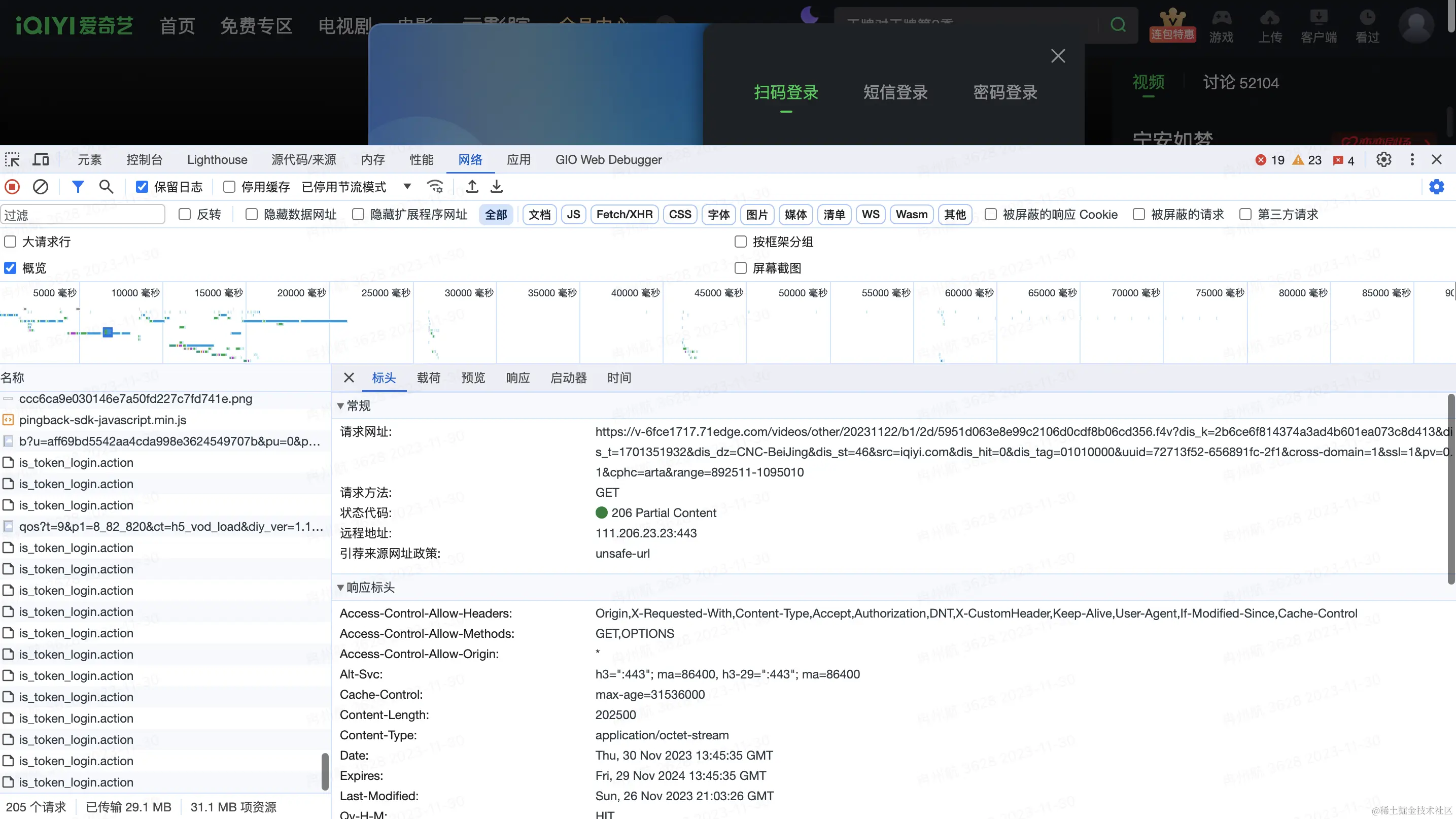
iQiyi's videos are primarily requested in the f4v format, also loaded in segments.
When playing a single video, multiple f4v files are requested.
Range is also used. But unlike Bilibili, where the Range attribute is in the request header of the m4s request, iQiyi's appears to be in the querystring, with the range parameter carried in the request query.
That's because no range parameter was found in this request's header. For example:
https://v-6fce1712.71edge.com/videos/other/20231113/6b/bb/3f3fe83b89124248c3216156dfe2f4c3.f4v?dis_k=2ba39ee8c55c4d23781e3fb9f91fa7a46&dis_t=1701439831&dis_dz=CNC-BeiJing&dis_st=46&src=iqiyi.com&dis_hit=0&dis_tag=01010000&uuid=72713f52-6569e957-351&cross-domain=1&ssl=1&pv=0.1&cphc=arta&range=0-9000
3. Douyin (TikTok China)
Douyin's approach is simple and blunt. The link visited is this: https://m.ixigua.com/douyin/share/video/7206914252840370721?aweme_type=107&schema_type=1&utm_source=copy&utm_campaign=client_share&utm_medium=android&app=aweme
By looking at the console, we can see it directly requests a single video address
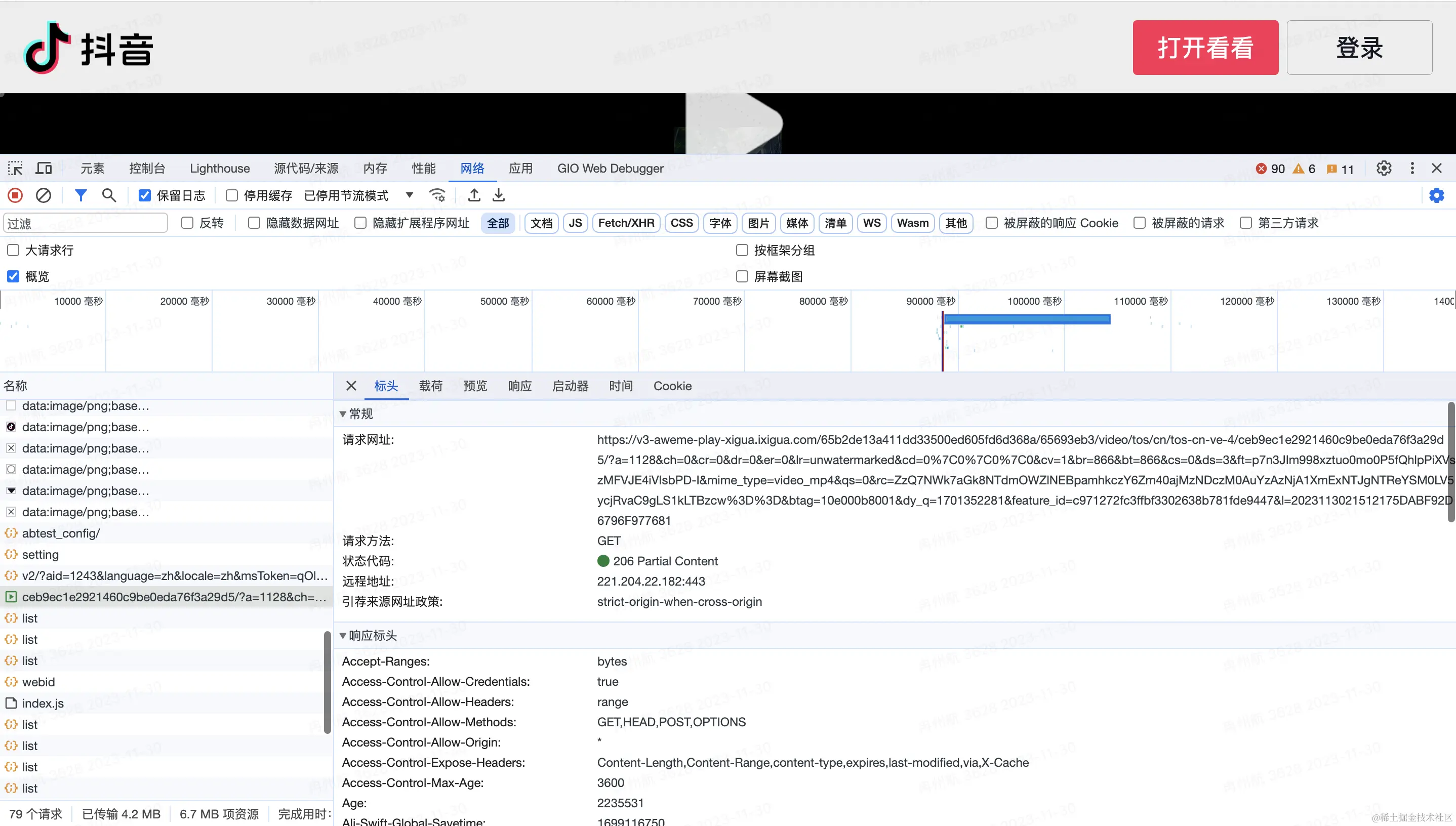
There's no segmentation, but the range request is used, so you can see the video buffering and playing at the same time.
However, I discovered during development that the cloud vendor I'm currently renting servers from implements this technology for us by default.
Because when I upload an mp4 video to the cloud server and play it via a link, it buffers and plays at the same time.
We can take this video address and paste it directly into the browser, where it plays right away — making the behavior easier to observe.

But Bilibili and iQiyi can't do this, because the m4s and f4v formats they use aren't generic video formats — they need specialized software or tools to open and edit.
4. Xiaohongshu (RED)
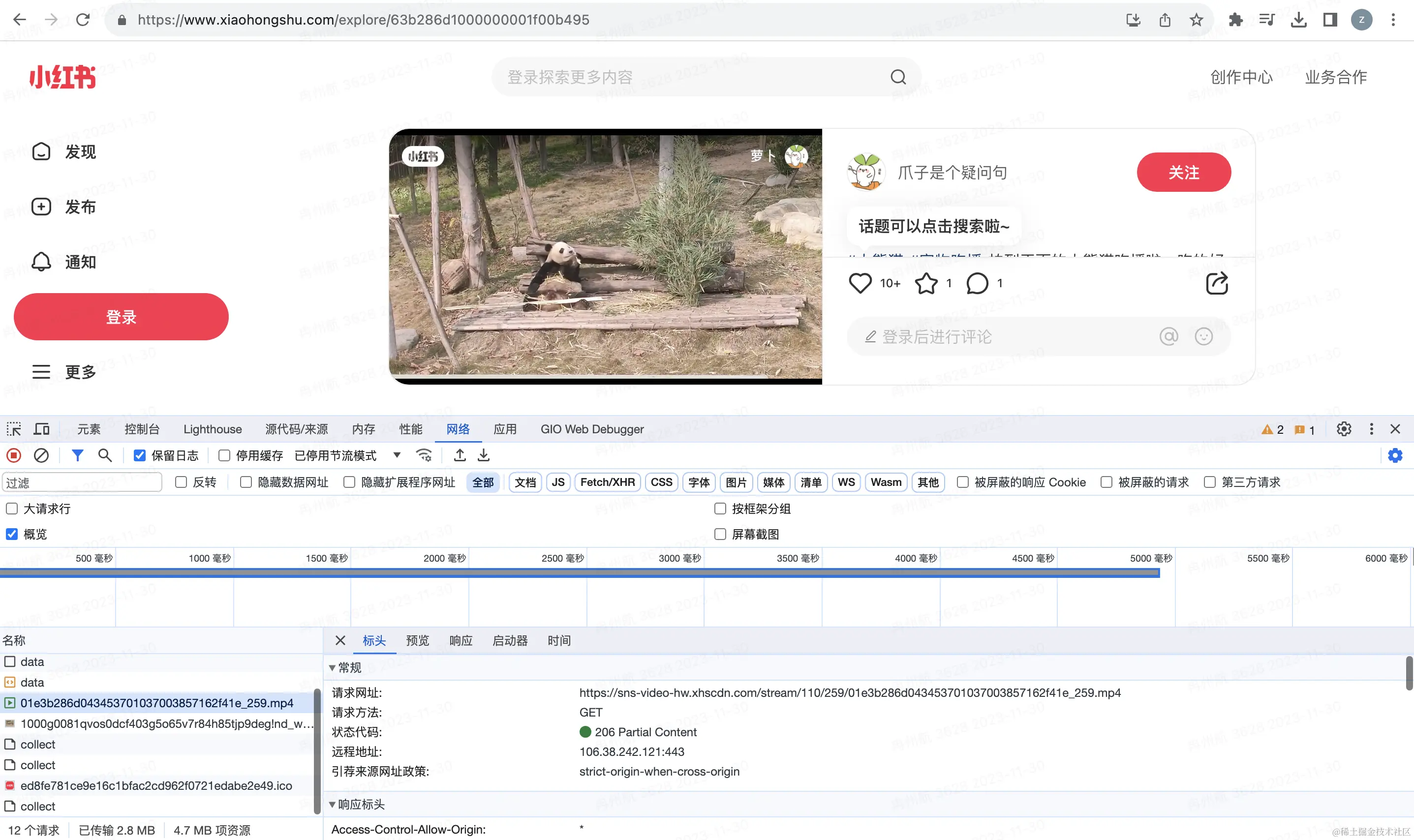
Test example link: https://www.xiaohongshu.com/discovery/item/63b286d1000000001f00b495
Xiaohongshu's approach is even more straightforward. Open the console, and it plainly requests an mp4 and just plays it — done.
5. Summary
After reviewing the above solutions from major companies, we can see the basic principle is the same: load while playing, to reduce the cost of loading a large video file all at once. Also, through segmented transmission, they can dynamically control video bitrate (resolution) — loading segment files at different bitrates depending on network speed to achieve dynamic bitrate adaptation.
At the same time, the video formats used, such as f4v and m4s, are not directly playable media formats and require some processing. This raises the cost of pirating videos and adds a degree of security.
If there's no strict requirement, you can also just use mp4 directly, or simply play a video file address with video.
II: Common Video Formats and Protocols
We know mp4 is a common video format. Above we also covered the m4s format used by Bilibili's player and the f4v format used by iQiyi.
- What other video formats are there besides these?
- Why are there so many video formats, and what are the differences between them?
- Why do these companies choose these particular formats for video playback?
1. m4s Used by Bilibili
The M4S format is not a generic video format — it requires specialized software or tools to open and edit.
M4S is typically used together with MPEG-DASH streaming technology, streaming a small portion of the video at a time. The player plays these segments in the order they're received. The first M4S segment contains some initialization data markers.
MPEG-DASH is an adaptive bitrate streaming technology that breaks content into a series of M4S segments at different bitrates, then automatically adjusts based on current network bandwidth. If you want to adopt DASH technology in web audio/video, check out https://github.com/Dash-Industry-Forum/dash.js
2. f4v Used by iQiyi
F4V is a streaming format introduced by Adobe, a successor to the FLV format that supports H.264 encoding. F4V-format video is not a generic video format, but generally, you can rename the file extension to FLV, allowing it to be viewed with any player that supports FLV.
Compared to the common MP4 format, the FLV format has a simpler structure, so loading metadata (video metadata, such as duration, etc.) is faster. You can find the detailed structure here: https://en.wikipedia.org/wiki/Flash_Video#Flash_Video_Structure
For example, here's the standard header of an FLV file, defining what each range of bits means. Once we understand this, we can use MediaSource to read and transcode it.
| Field | Data Type | Default | Details |
|---|---|---|---|
| Signature | byte[3] | "FLV" | Always "FLV" |
| Version | uint8 | 1 | Only 0x01 is valid |
| Flags | uint8 bitmask | 0x05 | 0x04 is audio, 0x01 is video (so 0x05 is audio + video) |
| Header Size | uint32_be | 9 | Used to skip newer extension headers |
The MP4 format is a bit more complex; the specific standard is defined in ISO/IEC 14496-12, which runs to over two hundred pages, so it won't fit here — if you're interested, feel free to look it up yourself.
That said, this doesn't mean MP4 is inferior — it's a general-purpose foundational standard, so its definitions leave a lot of room for various cases, and even allow for custom extensions within the standard. FLV, on the other hand, is more fixed, but its advantage is also its simplicity.
For FLV video playback, we can use: https://github.com/bilibili/flv.js flvjs's main job is to use MediaSource to transcode flv into mp4 for the browser to play.
Below are a few other video formats, briefly introduced:
3. AVI
Filenames end in .avi. AVI was originally developed by Microsoft in 1992 and was the standard video format for Windows. AVI files use less compression to store data, and they take up more space than many other video formats, leading to very large file sizes — roughly 2-3 GB per minute of video.
Lossless files don't degrade in quality over time, no matter how many times you open or save them. This also allows playback without any codec. Reference: Audio Video Interleave
4. MPEG
Filenames end in ".mpg" or ".mpeg". MPEG is a working group alliance jointly established by ISO and IEC, aimed at developing media encoding standards, including compression encoding for audio, video, graphics, and genomic data, as well as transport and file formats for various applications. The MPEG format is used across a wide range of multimedia systems. The most widely known legacy MPEG media formats typically use MPEG-1, MPEG-2, and MPEG-4 AVC media encoding, along with MPEG-2 systems transport streams and program streams. Newer systems generally use the MPEG base media file format and dynamic streaming (aka .MPEG-DASH). Reference: Moving Picture Experts Group
5. MP4
MPEG-4 files with audio and video typically use the standard .mp4 extension. Audio-only MPEG-4 files typically have a .m4a extension, and raw MPEG-4 visual bitstreams are named .m4v. Apple's iPhone uses MPEG-4 audio for its ringtones, but with a .m4r extension instead of .m4a. Reference: MPEG-4 Part 14
6. QuickTime
Filenames end in ".mov". QuickTime is able to contain abstract data references to media data and separates media data from media offsets and track edit lists, which means QuickTime is particularly well-suited for editing, since it can import and edit in place (without copying data). Because both QuickTime and MP4 container formats can use the same MPEG-4 format, in a QuickTime-only environment they are largely interchangeable. As an international standard, MP4 enjoys broader support. Reference: QuickTime File Format
7. TS
TS is short for MPEG2-TS, an audio/video container format. TS stream file extensions are typically .ts, .mpg, or .mpeg, and most players support this format for playback directly. The TS format is mainly used for live-streaming bitstream structures and has good fault tolerance.
III: Browser Compatibility with Various Video Formats
Now that we've covered common video formats and their use cases, we also need to look at current browser support for each video format before deciding on a technical approach.
1. Chrome
The supported video formats, per the official documentation, are mainly the following
- MP4 (QuickTime/ MOV / ISO-BMFF / CMAF)
- Ogg
- WebM
- WAV
- HLS [Only on Android and only single-origin manifests]
Official documentation: https://www.chromium.org/audio-video/
2. Safari
Supported video formats include:

Official documentation: https://developer.apple.com/library/archive/documentation/AudioVideo/Conceptual/Using_HTML5_Audio_Video/Device-SpecificConsiderations/Device-SpecificConsiderations.html
3. Firefox
Supported video formats:
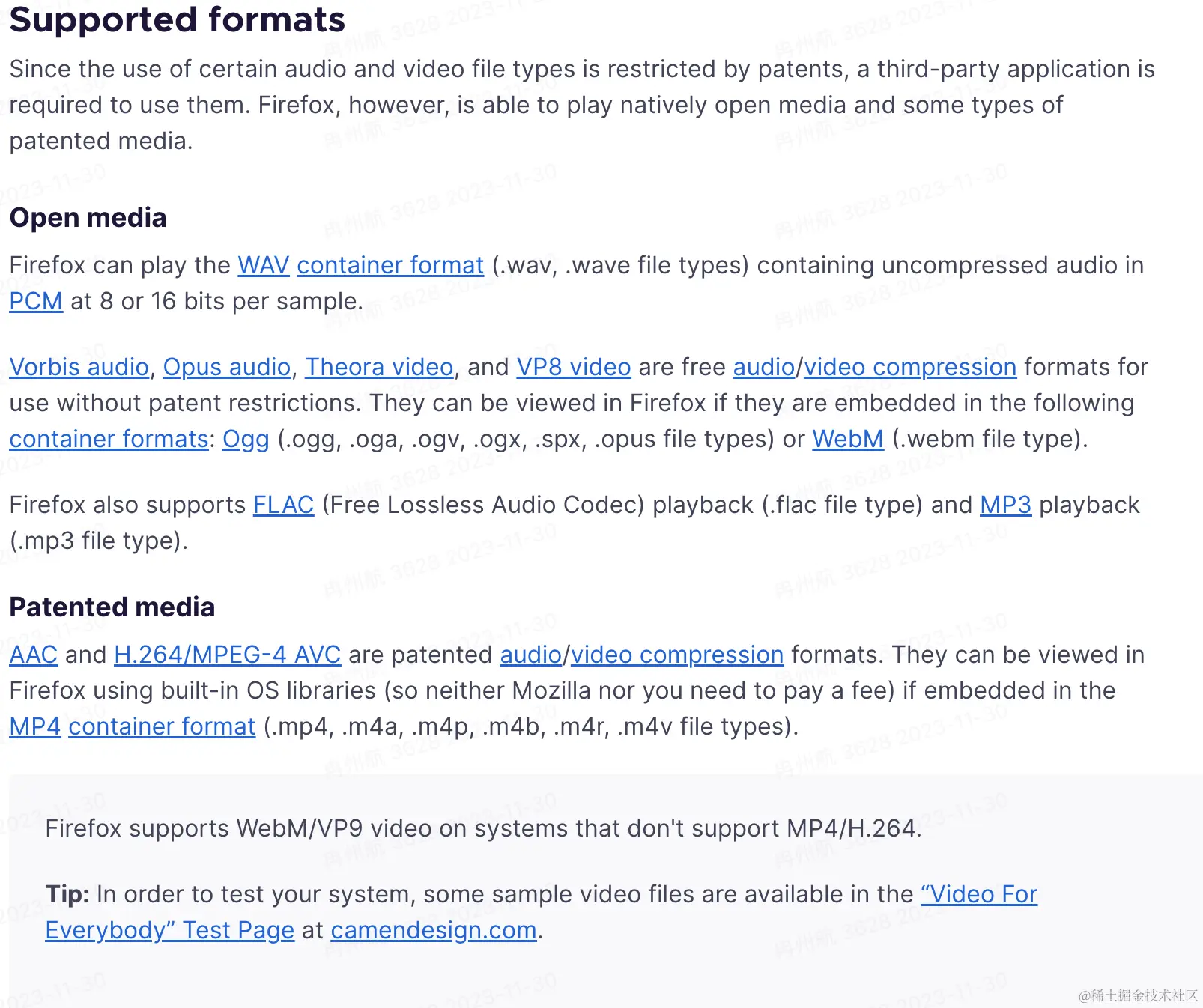
Official documentation: https://support.mozilla.org/en-US/kb/html5-audio-and-video-firefox
IV: An Introduction to MediaSource, Video Encoding, Decoding, and Muxing
Above we introduced some video formats and current browser compatibility issues. From this we can see that playing audio/video on the web still has significant limitations. To work around these limitations, we use MediaSource.
A video is essentially countless overlaid images. If a video runs at 60 frames per second, roughly 60 images need to be played every second. This means a video that's just a few minutes long ends up being very large. Take the lossless avi format mentioned above, for instance — roughly 2-3 GB per minute of video. This is where video needs to be encoded, which is really just compression.
Encoding is split into video encoding and audio encoding. Common video codecs include:
- MPEG family:
MPEG-1Part 2,MPEG-2Part 2 (equivalent toH.262),MPEG-4Part 2,MPEG-4Part 10 (equivalent toH.264, sometimes also called "MPEG-4AVC" or "H.264/AVC"). - H.26x family:
H.261,H.262,H.263,H.264(equivalent toMPEG-4Part 10),H.265/HEVC(jointly developed byITU-TandISO/IEC). - Other video codecs: the
WMVfamily, theRVfamily,VC-1,DivX,XviD,X264,X265,VP8,VP9,Sorenson Video,AVS.
Common audio codecs include: AAC, MP3, AC-3, etc.
After encoding, the audio and video streams still need to be combined into a single file — this is muxing (container packaging).
Correspondingly, playing a video requires demuxing, decoding, and feeding audio and video in sync to the sound card and graphics card for playback.
MediaSource is what handles this work: it reads the video stream and converts it into a format the browser can play.
Below is a snippet from flv.js's parseChunks function. It reads the buffer byte by byte, parses it according to the spec, then transcodes it.
if (byteStart === 0) {
  // buffer with FLV header
  if (chunk.byteLength > 13) {
    let probeData = FLVDemuxer.probe(chunk);
    offset = probeData.dataOffset;
  } else {
    return 0;
  }
}

if (this._firstParse) {
  // handle PreviousTagSize0 before Tag1
  this._firstParse = false;
  if (byteStart + offset !== this._dataOffset) {
    Log.w(this.TAG, 'First time parsing but chunk byteStart invalid!');
  }

  let v = new DataView(chunk, offset);
  let prevTagSize0 = v.getUint32(0, !le);
  if (prevTagSize0 !== 0) {
    Log.w(this.TAG, 'PrevTagSize0 !== 0 !!!');
  }
  offset += 4;
}
1. MediaSource Compatibility
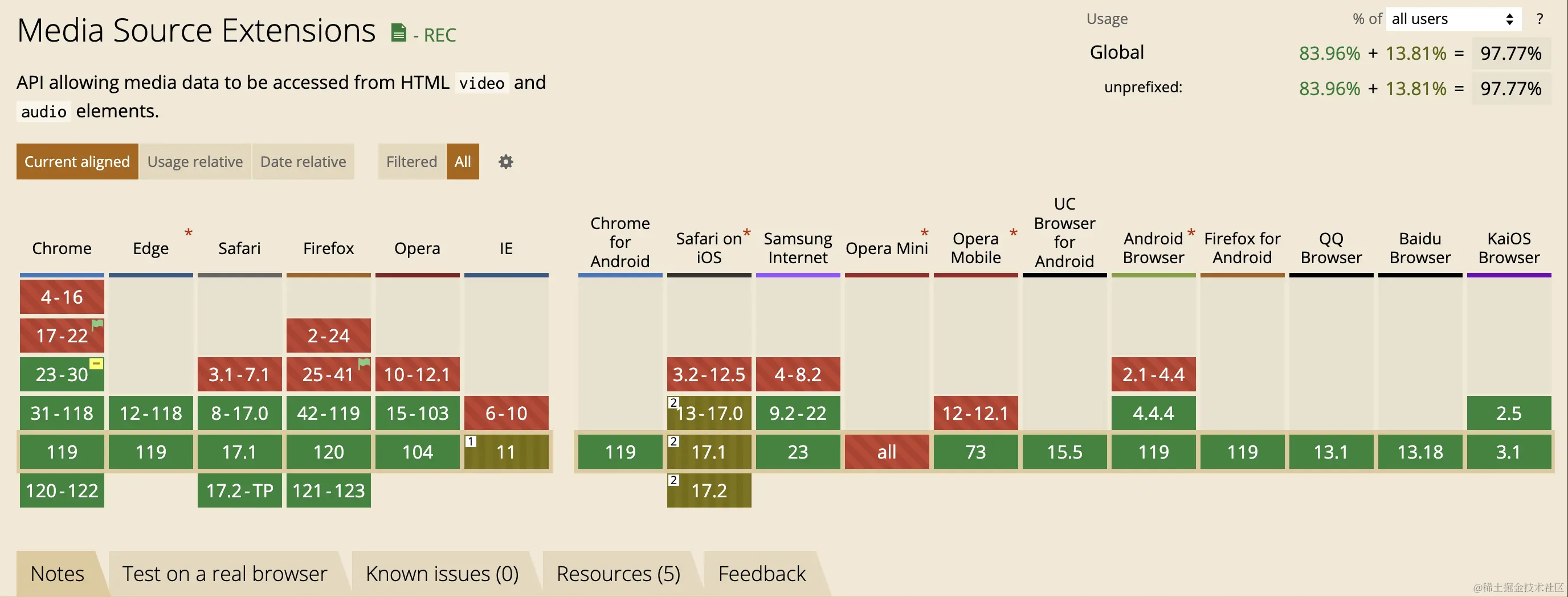
As you can see, it's mostly green, but there's one special case: Safari on iOS, which is still in the brownish/partial-support zone.
V: HLS Playback Solution
There are several reasons for adopting the HLS technical approach:
- Compatibility
Above we covered various video formats as well as browser compatibility.
The HLS protocol is implemented by Apple, and across Apple's full product line — including iPhone, iPad, Safari, and more — HLS playback is natively supported.
For other browsers, MediaSource can be used to demux, decode, and transcode for playback.
This also resolves MediaSource's compatibility issues.
- Business requirements
There's currently a strong need for video encryption — for example, requiring users to pay before watching certain videos. The HLS protocol comes with standard encryption built in, and it also supports extending it with private encryption schemes.
- The
HLSprotocol natively supports segmented transmission and dynamic bitrate-adaptive playback. There's an existing technical solution: Hls.js
VI: Back-End Development
Having chosen the HLS protocol for playback, the first step is video processing, which is currently handled on the server side, leveraging ffmpeg's capabilities.
It would be great if ffmpeg could someday run in the browser without performance issues. There are webassembly-based npm packages for this now, but they have some performance problems
1. Video Transcoding
The ffmpeg command for video transcoding is as follows:
ffmpeg -i input.mp4 -hls_time 10 -hls_list_size 0 -c:v h264 -b:v 2M -hls_segment_filename output_%05d.ts output.m3u8 -yExplanation of each parameter:
-ispecifies the input video-hls_timespecifies the segment duration, in seconds-hls_list_sizespecifies the number of entries in thehlslist; here it's unlimited-c:vspecifies the video codec-b:vspecifies the video bitrate; here it's2Mbits per second-hls_segment_filenamespecifies the outputtsfilename pattern; here it meansoutput_plus a five-digit numberoutput.m3u8specifies the outputm3u8filename-yin some scenarios (e.g. whether to overwrite), just answer yes directly to avoid the program hanging
To automate this, we use Node's spawn module to create a child process and run the ffmpeg command inside it.
const exec = ({ params, data }: ExecOption): Promise<ExecResult> => {
  return new Promise((r, j) => {
    const cp = spawn('ffmpeg', params);
    cp.stderr.pipe(process.stdout);
    cp.on('error', (err) => {
      j(err);
    });
    cp.on('close', (code) => {
      r({ code, data });
    });
    cp.on('exit', (code) => {
      r({ code, data });
    });
  });
};
At this point, the video gets output at the specified location, generating one m3u8 and multiple ts files
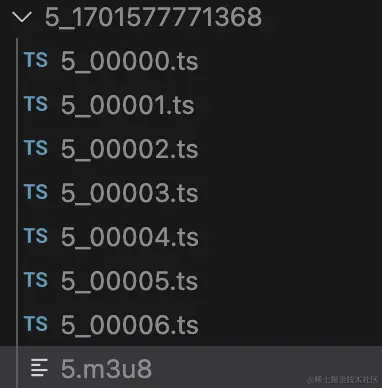
ts files are the video content, while m3u8 acts more like an index file describing the ts files — for example, at what time to play which ts file. The main content looks like this:
#EXTM3U
#EXT-X-VERSION:3
#EXT-X-TARGETDURATION:10
#EXT-X-MEDIA-SEQUENCE:0
#EXTINF:10.380622,
5_00000.ts
#EXTINF:10.380622,
5_00001.ts
#EXTINF:10.380622,
5_00002.ts
#EXTINF:10.380622,
5_00003.ts
#EXTINF:6.560556,
5_00004.ts
#EXTINF:1.619378,
5_00005.ts
#EXTINF:5.024189,
5_00006.ts
#EXT-X-ENDLIST
2. Standard Video Encryption
HLS's standard encryption uses the AES symmetric encryption scheme. Let's start by implementing the most standard version of encryption:
First, generate an encryption key using Node's native crypto module:
import crypto from 'node:crypto';
// Generate the encryption key
const key = crypto.createHash('sha256').update(crypto.randomBytes(32)).digest('base64');
const filePathKey = path.join(__dirname, `../../public/uploads/hls/${dir}/${fileName}.key`);

const content = `${ctx.origin}/uploads/hls/${dir}/${fileName}.key\n${filePathKey}\n`;
// The key file
const fileKey = await writeFile(path.join(__dirname, `../../public/uploads/hls/${dir}/${fileName}.key`), key);
const keyInfoPath = path.join(__dirname, `../../public/uploads/hls/${dir}/${fileName}_key.bin`);
// The key.info that ffmpeg needs
const keyInfo = await writeFile(keyInfoPath, content);
Then run the ffmpeg command, again wrapped as an interface using Node's spawn module:
ffmpeg -i input.mp4 -hls_time 10 -hls_list_size 0 -c:v h264 -b:v 2M -hls_key_info_file keyInfoPath -hls_segment_filename output_%05d.ts output.m3u8 -yThis simply adds a hls_key_info_file parameter, pointing to the encryption key's location. At this point, the generated m3u8 file changes, gaining an extra line:
#EXTM3U
#EXT-X-VERSION:3
#EXT-X-TARGETDURATION:10
#EXT-X-MEDIA-SEQUENCE:0
#EXT-X-KEY:METHOD=AES-128,URI="http://localhost:30103/uploads/hls/5_1701577743851/5.key",IV=0x00000000000000000000000000000000
#EXTINF:10.380622,
5_00000.ts
#EXTINF:10.380622,
5_00001.ts
#EXTINF:10.380622,
5_00002.ts
#EXTINF:10.380622,
5_00003.ts
#EXTINF:6.560556,
5_00004.ts
#EXTINF:1.619378,
5_00005.ts
#EXTINF:5.024189,
5_00006.ts
#EXT-X-ENDLIST
Namely this extra line:
#EXT-X-KEY:METHOD=AES-128,URI="http://localhost:30103/uploads/hls/5_1701577743851/5.key",IV=0x00000000000000000000000000000000- The
METHODfield indicates the encryption method — here it'sAES URIindicates the key's location — here it'shttp://localhost:30103/uploads/hls/5_1701577743851/5.keyIVis the offset used for encryption/decryption — currently 0
With this encryption approach, the video is indeed encrypted, but the key's address is written right into the m3u8 file. It's the equivalent of locking a room, then taping a note with the password right on the lock.
3. A Better Security Approach
- Wherever there's encryption, there must be decryption
First, we know that for a video to be played on the web, it must inevitably be decrypted before playback, no matter what.
- The key definitely cannot be placed on the
webside - The
webside needs to know how to obtain the key - The key should be single-use and expire after use, with a new key generated every time a video is encrypted
Currently there are two main approaches for better security:
- Harden the endpoint that requests the key:
- Validate
cookies — since it's a request, the same domain automatically carriescookies, so only users who have already purchased access can obtain the key. (We certainly can't let paying users be unable to watch either) - When generating the key link, attach a
ticketthat expires quickly, to control its time window - Carry
authin the request header for user verification — this is how, for example, ajwtscheme works
- Use a private encryption scheme — for instance, the
METHODfield in them3u8might no longer beAESsymmetric encryption. Define your own custom encryption rules, which greatly improves security, but at the cost of no longer conforming to theHLSprotocol standard. However, most browsers supportMediaSource, which can read file contents and perform custom encryption/decryption. Based on the compatibility research above,MediaSourcehas compatibility issues oniOS, so this approach will also run into compatibility issues oniOS.
4. Adaptive Bitrate Playback
Let's first cover the relationship between bitrate and resolution:
Bitrate refers to:
Bitrate (also called bit rate) refers to the data throughput a video file uses per unit of time. It reflects the degree of data compression in the video file — the higher the bitrate, the smaller the compression ratio, and the higher the picture quality, but also the larger the file size. In simple terms, bitrate can be thought of as a sampling rate, and it's the single most important factor in picture-quality control during video encoding. The formula is: file size = time × bitrate / 8.
So simply put, the higher the bitrate, the better the resolution/clarity — they're directly proportional.
You need to define this based on video quality and the business scenario. Here's Alibaba Cloud's definition of bitrate versus resolution, for reference:
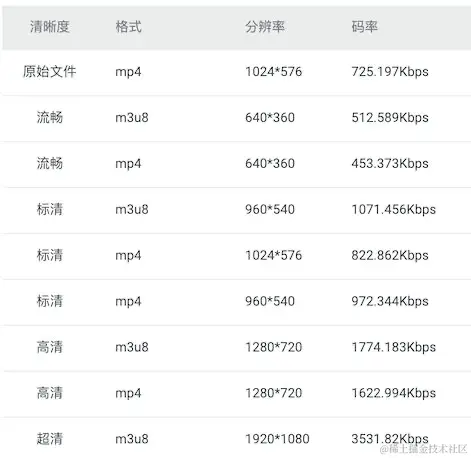
To implement adaptive bitrate playback, we need to merge m3u8 files at different bitrates into a single multi-bitrate m3u8.
I couldn't find a suitable ffmpeg command for this, but there's always a way — the most universal method is to look at the multi-bitrate m3u8 format standard within the HLS protocol and write one ourselves.
Here we use node to write such an index file, with content like this:
#EXTM3U
#EXT-X-STREAM-INF:PROGRAM-ID=1,BANDWIDTH=1000000,CODECS="mp4a.40.2,avc1.64001f",RESOLUTION=1280x720,NAME="720"
hls/5_1701577771368/5.m3u8
#EXT-X-STREAM-INF:PROGRAM-ID=2,BANDWIDTH=50000,CODECS="mp4a.40.5,avc1.42000d",RESOLUTION=320x184,NAME="320"
hls/5_1701577744714/5.m3u8#EXT-X-STREAM-INF: description of the streaming mediaPROGRAM-ID: represents a uniqueIDBANDWIDTH: the streaming media's bandwidth, i.e. the amount of data transferred per second. Here bandwidth is50000, meaning roughly50kbpstransferred per secondCODECS: the codecs used by the streaming media. Here it usesmp4a.40.5(AACaudio codec) andavc1.42000d(AVCvideo codec)RESOLUTION: this field indicates the video's resolution, i.e. width and height. In this example, the video resolution is320x184NAME: this field gives the stream a name — in this example the name is "320". I tend to put the resolution label in theNAMEfield for convenient access by thewebside
Implement an interface that takes the above parameters, dynamically concatenates the string, and writes it to a file
async generateMasterPlayList(ctx: Context): Promise<void> {
    try {
      const { paths, filename = Date.now() } = ctx.request.body;
      let content = `#EXTM3U\n`;
      paths.forEach((item: MasterPlayListOption, index: number) => {
        const { id = index, bandWidth, codecs, resolution, name, url } = item;
        content += `#EXT-X-STREAM-INF:PROGRAM-ID=${id},BANDWIDTH=${bandWidth},CODECS="${codecs}",RESOLUTION=${resolution},NAME="${name}"\n${url}\n`;
      });
      const dir = path.join(__dirname, `../../public/uploads/hls/`);
      if (!existsSync(dir)) {
        await createDir(dir);
      }
      const filePath = dir + (filename.toString().endsWith('.m3u8') ? filename : `${filename}.m3u8`)
      const { success, error } = await writeFile(filePath, content);
      const basename = path.basename(filePath);
      return success
        ? ctx.successHandler({
            url: `${ctx.origin}/uploads/hls/${basename}`,
          })
        : ctx.failHandler(error);
    } catch (error) {
      ctx.errorHandler(error);
    }
  }
So how does HLS achieve adaptive bitrate?
It's actually based on the BANDWIDTH field, since we've set different BANDWIDTH values for different video variants. That means the player can dynamically switch between them based on the current network speed.
VII: Web-Side Implementation
The work above was mainly about generating HLS-protocol video playback addresses. Next comes actually playing them on the web side.
1. Technology Selection
I started by looking at existing npm player packages, the more well-known ones being
- Douyin's
xigua player: https://github.com/bytedance/xgplayer - Alibaba Cloud's VOD solution: https://help.aliyun.com/zh/vod/developer-reference/overview-14
- Zhihu's
player: https://github.com/zhihu/griffith
Zhihu's and Xigua's players are open source; Alibaba Cloud's VOD solution isn't open source, but does have an open-source demo.
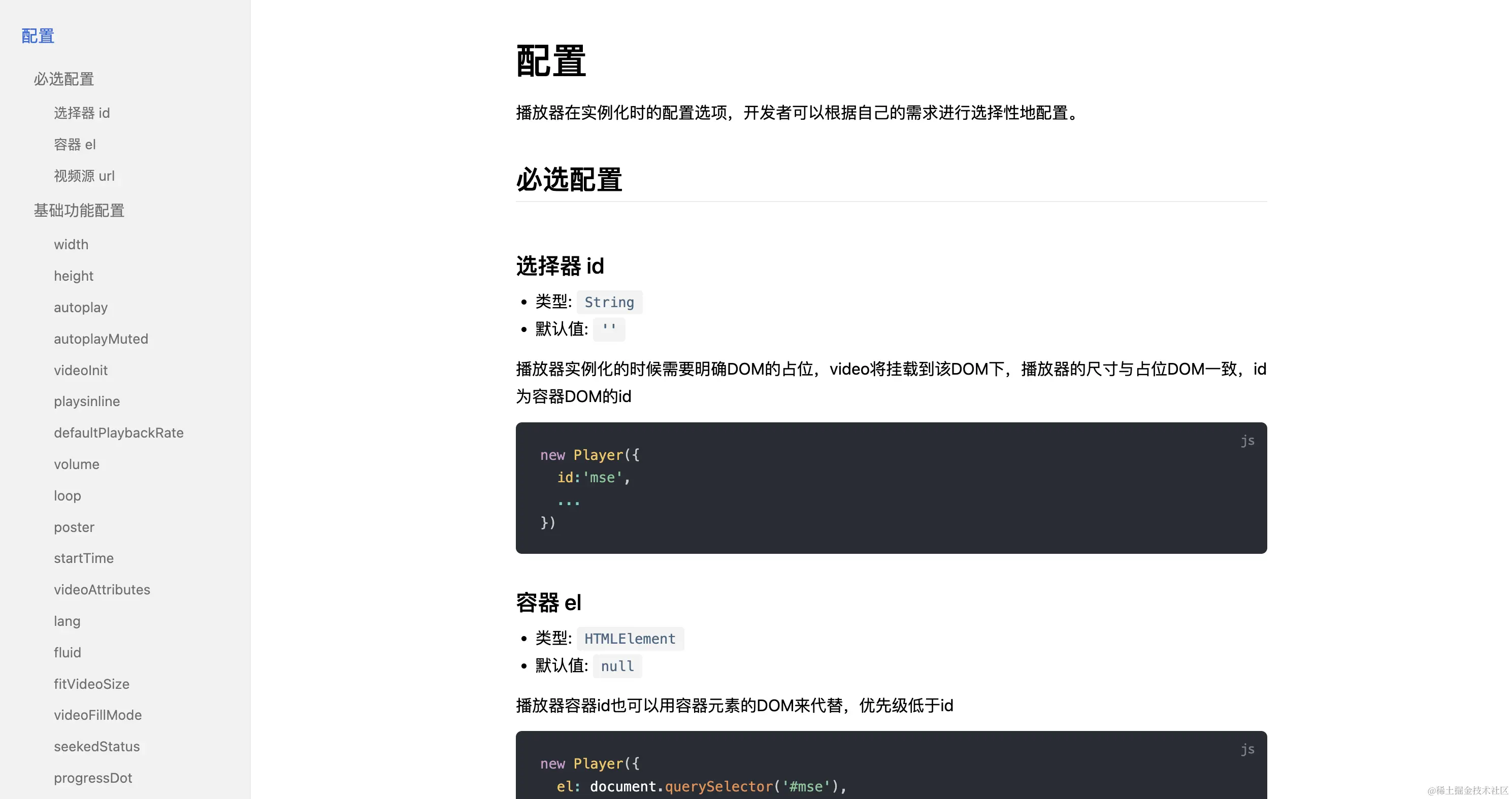
But they generally implement a rich feature set, and their configuration options keep growing.
If you're just doing a simple player initialization, that's fine. But typically in this kind of scenario, you'll want to customize the player to some degree — take Bilibili, for example.
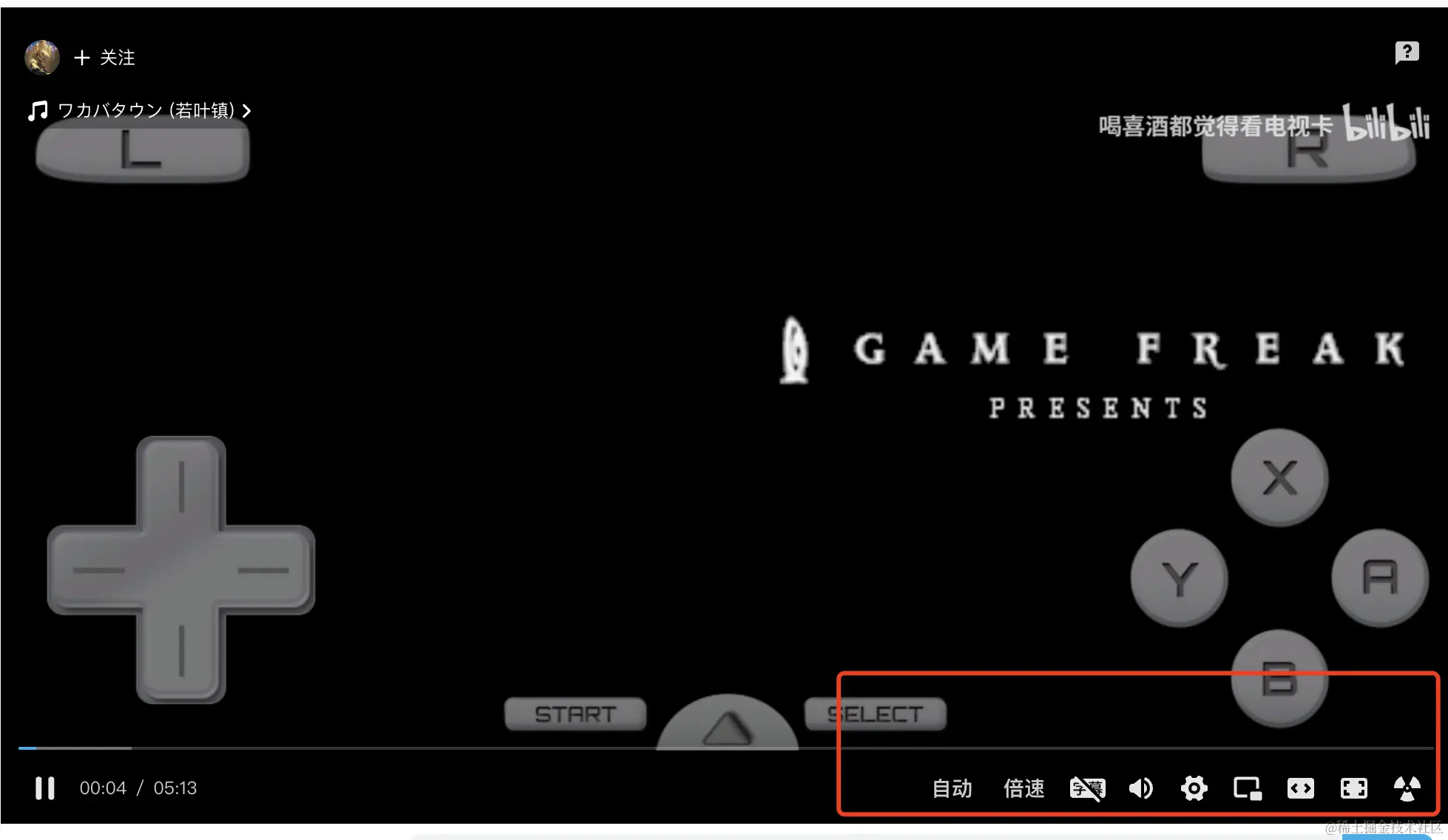
It has quite a few custom controls added. Even the progress bar is shaped like a little TV.
The same is true for us — we have our own theme colors, our own play button, and so on, plus some business-specific features that also need to go on the control bar.
The open-source solutions above all require time spent studying their configuration options, and they're all used in the new Player(options) style.
But it's generally better to keep the view as the view, and the logic as the logic.
Besides, implementing a player isn't actually that hard.
The ideal player should satisfy:
- Configuration simple enough that you can tell how to use it just by looking at it
- Easy to extend and override styles
- Support for
hlsplayback - Compatible with as many front-end frameworks as possible
- Easy to integrate, delivering value quickly
2. Player Design
Since we have react projects, vue projects, and even some legacy jquery projects, to achieve "develop once, use anywhere," we adopted the web components approach.
I won't go into web components in detail here — you can read this article for more: Hand-writing web components In short, it lets you define custom elements and use them just like a regular div.
For the player, the things we need to consider are:
videolifecycle:loadedmeta,canplay,ended,error, etc.videostate: playing, currently playing, paused, muted, etc.videoproperties: total duration, current time, volume level, playback rate, etc.videointeractions: pause, play, chapter markers, resolution, playback rate, fullscreen, progress control, volume control, etc.
(1). The Video Lifecycle
For the video's lifecycle, we want to accomplish two things:
- Know what lifecycle stage the current
videois in - Be able to hook custom events at different lifecycle stages. For example, when the video fires
ended, we need to jump to the next video during theendedphase
So, we need to listen to the video's lifecycle:
listenEvent = () => {
  if (!this._video) return;
  this.clearListenerEvent();
  this._video.addEventListener('canplay', this.onCanplay);
  this._video.addEventListener('canplaythrough', this.onCanplaythrough);
  this._video.addEventListener('complete', this.onComplete);
  this._video.addEventListener('durationchange', this.onDurationchange);
  this._video.addEventListener('emptied', this.onEmptied);
  this._video.addEventListener('ended', this.onEnded);
  this._video.addEventListener('error', this.onError);
  this._video.addEventListener('loadeddata', this.onLoadeddata);
  this._video.addEventListener('loadedmetadata', this.onLoadedmetadata);
  this._video.addEventListener('loadstart', this.onLoadstart);
  this._video.addEventListener('pause', this.onPause);
  this._video.addEventListener('play', this.onPlay);
  this._video.addEventListener('playing', this.onPlaying);
  this._video.addEventListener('progress', this.onProgress);
  this._video.addEventListener('ratechange', this.onRatechange);
  this._video.addEventListener('seeked', this.onSeeked);
  this._video.addEventListener('seeking', this.onSeeking);
  this._video.addEventListener('stalled', this.onStalled);
  this._video.addEventListener('suspend', this.onSuspend);
  this._video.addEventListener('timeupdate', this.onTimeupdate);
  this._video.addEventListener('volumechange', this.onVolumechange);
  this._video.addEventListener('waiting', this.onWaiting);
};
To let developers know when each stage fires, we first define a custom event and dispatch it
const change = (name: string, value: unknown): void => {
  const currentTime = this.getCurrentTime();
  const duration = this.getTotalTime();
  this.dispatchEvent(
    new CustomEvent('change', {
      detail: {
        type: name,
        data: value,
        currentTime,
        duration,
        tag: this, // The whole player instance
      },
    }),
  );
};
const onCanplaythrough = (e: Event) => {
  this.ctx.currentState = e.type;
  this.change('canplaythrough', e);
};
This way, whenever a lifecycle event fires, onchange is triggered. In usage, we can do:
<r-player onChange={change} src="hls/example.m3u8" ></r-player>

const change = (e:CustomEvent) => {
    const { type, data, currentTime, duration, tag } = e.detail
    if(type === 'ended'){
        console.log('video ended')
    }
}
The possible values of type are:
| Name | Description |
|---|---|
| canplay | The browser can play the media file, but likely doesn't have enough data buffered to play through to the end without further buffering. |
| canplaythrough | The browser estimates it can play the media through to the end without needing to stop for further buffering. |
| complete | OfflineAudioContext rendering has completed. |
| durationchange | Fires when the value of the duration property changes. |
| emptied | The media content becomes empty — for example, when the media has finished (or partially finished) loading and load() is called to reload it. |
| ended | Playback has stopped because the end of the media has been reached. |
| loadedmetadata | Metadata has finished loading. |
| progress | Fires periodically as the browser loads a resource. |
| ratechange | The playback rate has changed. |
| seeked | A seek operation has completed. |
| seeking | A seek operation has begun. |
| stalled | The user agent is trying to fetch media data, but the data unexpectedly hasn't arrived. |
| suspend | Media data loading has been suspended. |
| loadeddata | The first frame of the media has finished loading. |
| timeupdate | The time indicated by the currentTime property has changed. |
| volumechange | The volume has changed. |
| waiting | Playback has stopped due to a temporary lack of data. |
| play | Playback has started. |
| playing | Playback is ready to begin after having been paused or delayed due to a lack of data. |
| pause | Playback has been paused. |
| volume | The volume has changed. |
| fullscreen | A fullscreen event has fired |
We need a way to hook into different lifecycle stages, so we need a publish/subscribe class.
type Callback = (...args: unknown[]) => unknown;

type EventName = string | symbol;

type EventItem = {
  name?: string | symbol;
  callback: Callback;
  initialCallback?: Callback;
};

const NEW_LISTENER = 'NEW_LISTENER';

export class SyncHook {
  private _events: Record<EventName, Array<EventItem>>;
  constructor() {
    this._events = {};
  }
  on = (eventName: EventName, eventItem: EventItem | Callback): void => {
    if (this._events[eventName] && eventName !== Symbol.for(NEW_LISTENER)) {
      this.emit(Symbol.for(NEW_LISTENER), eventName);
    }

    const callbacks = this._events[eventName] || [];
    if (typeof eventItem === 'function') {
      callbacks.push({
        name: eventName,
        callback: eventItem,
      });
    } else {
      callbacks.push(eventItem);
    }

    this._events[eventName] = callbacks;
  };

  emit = (eventName: EventName, ...args: Array<unknown>): void => {
    const callbacks = this._events[eventName] || [];
    callbacks.forEach((item) => {
      const { callback } = item;
      callback(...args);
    });
  };

  once = (eventName: EventName, eventItem: EventItem | Callback): void => {
    let one: EventItem;
    if (typeof eventItem === 'function') {
      one = {
        name: eventName,
        callback: (...args: Array<unknown>) => {
          eventItem(...args);
          this.off(eventName, one);
        },
        initialCallback: eventItem,
      };
    } else {
      const { callback } = eventItem;
      one = {
        name: eventName,
        callback: (...args: Array<unknown>) => {
          callback(...args);
          this.off(eventName, one);
        },
        initialCallback: callback,
      };
    }
    this.on(eventName, one);
  };

  off = (eventName: EventName, eventItem: EventItem | Callback): void => {
    const callbacks = this._events[eventName] || [];
    const newCallbacks = callbacks.filter((item) => {
      if (typeof eventItem === 'function') {
        return item.callback !== eventItem && item.initialCallback !== eventItem;
      } else {
        const { callback } = eventItem;
        return item.callback !== callback && item.initialCallback !== callback;
      }
    });
    this._events[eventName] = newCallbacks;
  };
}
So we add a ctx property to the player element, serving as a global context.
this.ctx = {
  currentTime: 0, // Current time
  duration: 0, // Total duration
  currentState: '', // Current video state
  action: new SyncHook(), // States fired at different stages
};
If we want to subscribe to the video's ended event, we can do so
Via a Ref:
<r-player ref={PlayerRef} onChange={change} src="hls/example.m3u8" ></r-player>

const endedEvent = () => {
    console.log('video ended')
}

PlayerRef.current.ctx.action.off('ended',endedEvent)

PlayerRef.current.ctx.action.on('ended',endedEvent)
Or via the instance obtained through the change method:
<r-player onChange={change} src="hls/example.m3u8" ></r-player>

let player

const endedEvent = () => {
    console.log('video ended')
}

const change = (e:CustomEvent) => {
    const { type, data, currentTime, duration, tag } = e.detail
    player = tag
}

player.action.off('ended',endedEvent)
player.action.on('ended',endedEvent)
(2). Video State and Properties
We need to record the player's state and properties in the global context:
this.ctx = {
  currentTime: 0, // Current time
  duration: 0, // Total duration
  currentState: '', // Current video state
  action: new SyncHook(), // States fired at different stages
  volume: 0.5, // Current volume
  playbackRate: 1, // Current playback rate
  clarity: '', // Current resolution
  fullScreen: false, // Whether fullscreen
  levels: [], // List of available resolutions
  url: '', // Currently playing URL
  levelMap: new Map(), // Mapping between resolution and display name
};
(3). Customizing the Video
By default, it looks like this
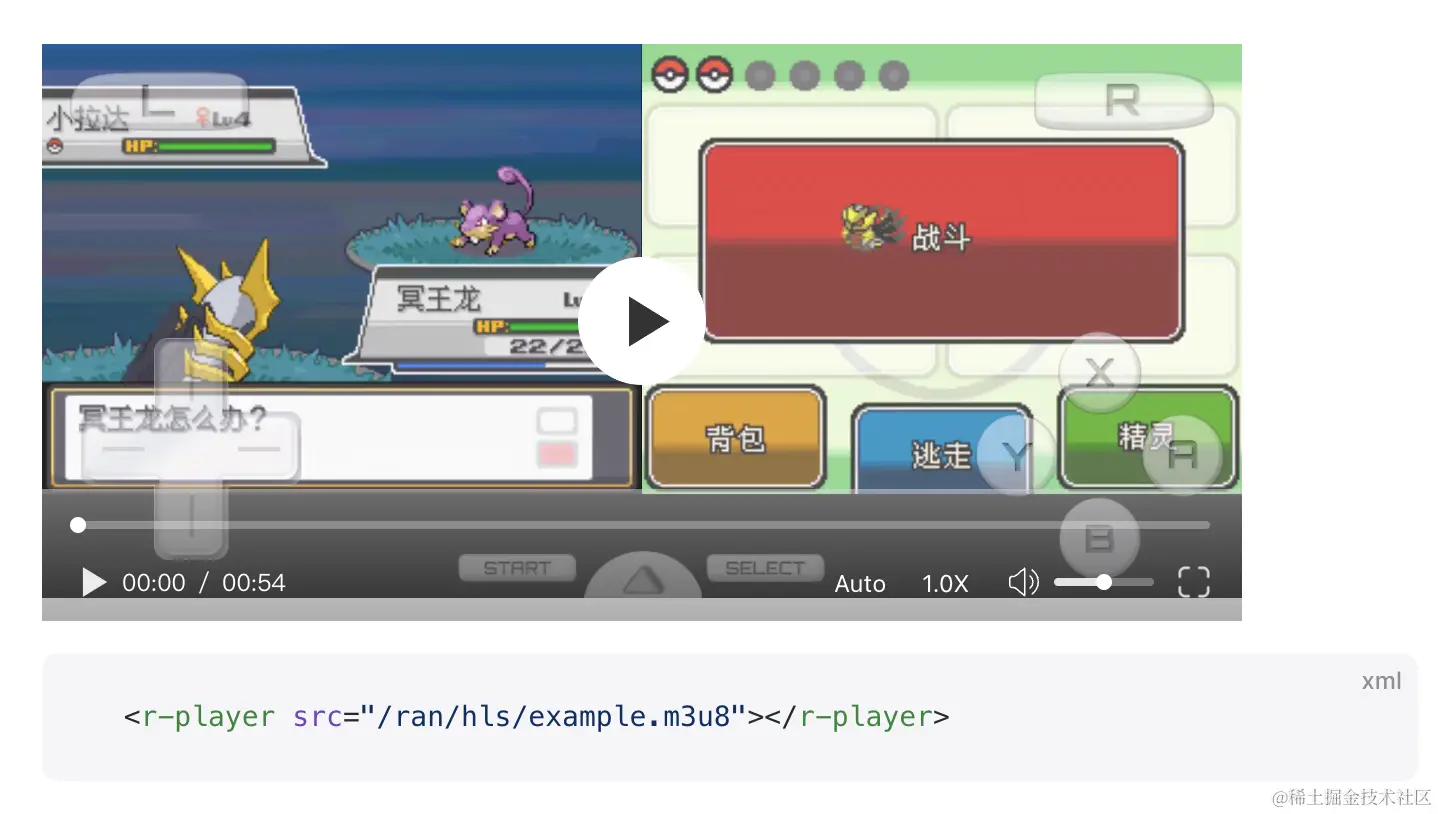
Demo: https://ran.chaxus.com/src/ranui/player/
Source code: https://github.com/chaxus/ran
If you don't like the controller or buttons, overriding the styles directly is more intuitive and requires no learning curve.
.ran-player-controller {
  display: none;
}
Since the player itself is just an element, you can add arbitrary elements and logic inside it.
<r-player onChange={change} src="hls/example.m3u8">
  <div>111111</div>
</r-player>
So this solves the problem of configuration options spanning several pages — you can tell how to configure and develop it just by looking at it.
VIII: Summary
At this point, from both the front-end and back-end sides, we've implemented
- Standard video encryption
- Dynamic bitrate video playback
- Segmented video loading
- Draggable progress bar
- Volume control
- Manual resolution switching
- Variable playback speed
- Custom style overrides
- Built with native technology, runs in any framework, unifying cross-framework scenarios, with consistent controls across browsers
Here are the demo and source code links:
demo and documentation: https://ran.chaxus.com/src/ranui/player/
Source code: https://github.com/chaxus/ran
The demo documentation has been internationalized and can be switched to Chinese